CLAUDE CODE + CODEX · ON YOUR MAC

Run your agents.
Keep every change
in view.

Bring Claude Code and Codex into one Mac workspace. Run tasks in parallel, review the diff, and handle approvals without losing your place.

Apple silicon · macOS 13 or later
Free app. Your Claude or Codex account and usage still apply.

A real change. A clear decision.
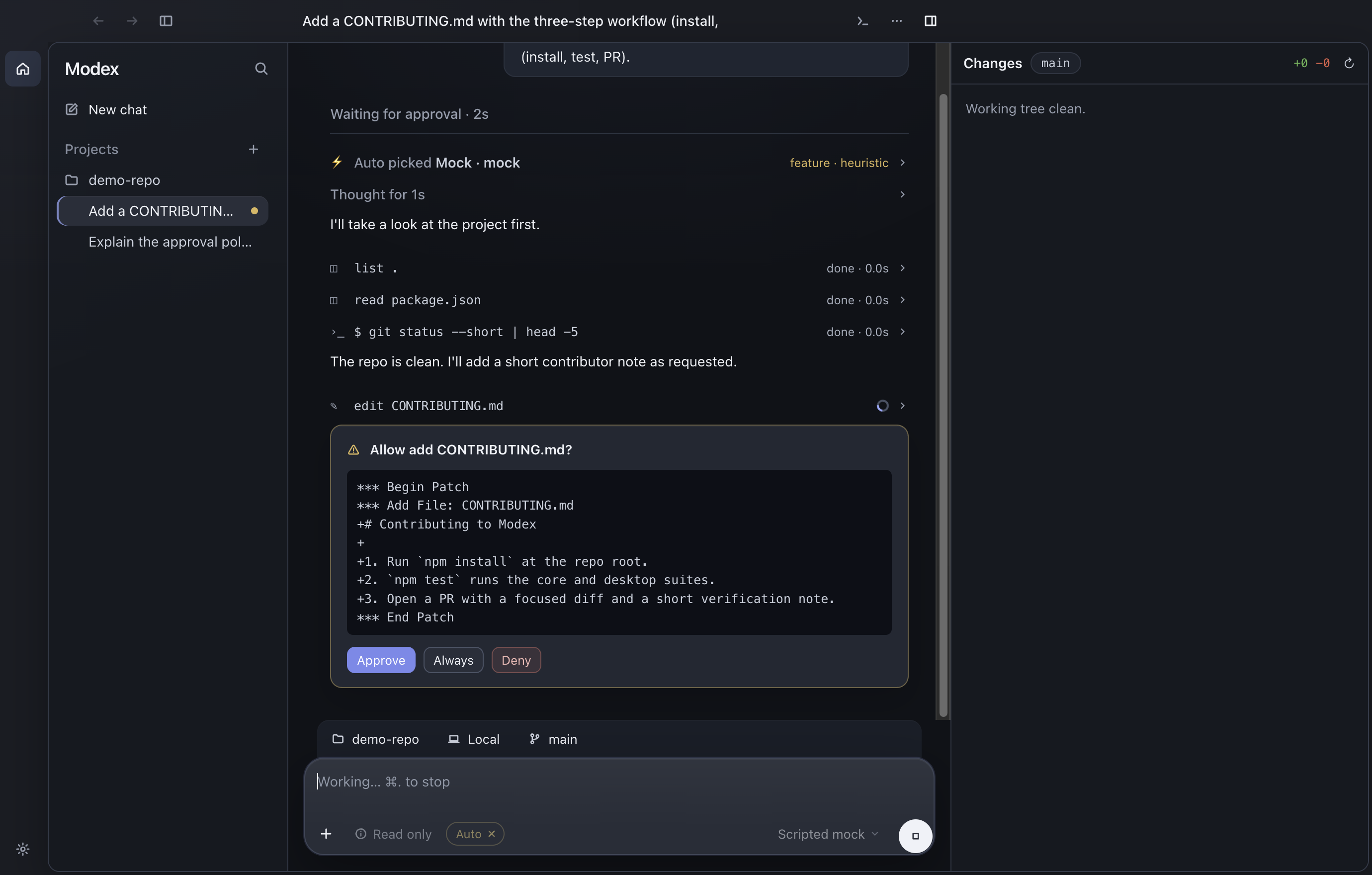
A proposed CONTRIBUTING.md patch in Modex, with Approve, Always and Deny controls
CONTRIBUTING.mdReview before it runs

Real app capture · scripted demo project

THE WORK, FROM START TO FINISH

One task.
Nothing lost between steps.

A small example: add a contributor guide. Follow the request, the proposed edit, and the approved result in the same thread.

01 / THE REQUEST

Give the task a home.

Open a project and start a thread. Your request, the agent’s work, and its changes stay together.

“Add a CONTRIBUTING.md with the three-step workflow: install, test, PR.”

A real demo task, ready to follow.

Modex follows the contributor-guide request, reads the project and prepares a patch
Actual Modex demo · no model account required for demo mode

MORE ROOM FOR THE WAY YOU BUILD

Your tools.
A more connected workflow.

Keep your agent access and your local projects. Bring the decisions, branches, and useful context into the same workspace.

CHOOSE PER TASK

Claude Code or Codex.
Your call.

Use the agent that fits the work, with your existing account. Each thread keeps its own provider and model.

For example · Ask Claude to explore a design while Codex works through a focused implementation.

MAKE ROOM FOR PARALLEL WORK

Separate tasks.
Separate checkouts.

Start a worktree thread to give a task its own branch and working directory. Keep branch, PR status, and diffs close to the conversation.

For example · Fix a bug and explore a feature in separate worktrees, then review each change before merging.

KEEP WHAT THE WORK TEACHES YOU

Context that
carries forward.

Keep project notes in Pages and let agents maintain them when enabled. Connect a Markdown knowledge folder through the local OpenKnowledge companion.

For example · Save a project decision once, then let the next task find and build on it.

See how project context works

FROM DOWNLOAD TO YOUR FIRST TASK

Bring a project.
You can start there.

Modex is free and open source. Coding runs through your own Claude Code or Codex access; your provider’s plan and usage limits apply.

  1. Connect your agent.

    Install Claude Code or Codex and sign in. Already using either CLI? Keep your existing login.

    Installation & CLI setup
  2. Open a project.

    Choose a folder on your Mac. Your files stay in your local project, with its existing instructions and tools.

  3. Start a task.

    Choose an agent, describe the work, and follow its progress. Review changes and respond when it needs a decision.

Make room for your next idea.

Apple silicon · macOS 13 or later · v0.0.10

Download for MacRelease notes & ZIP download
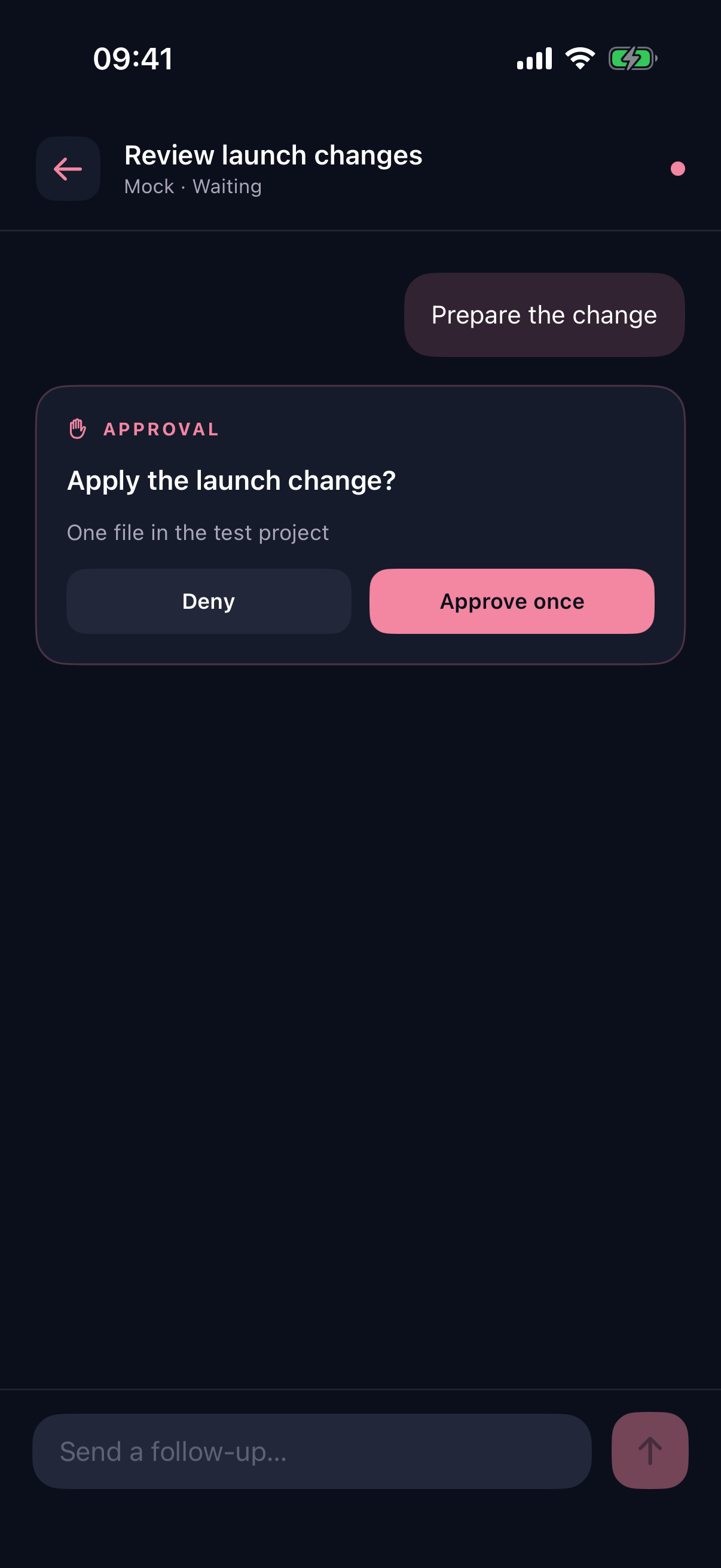
A real Modex Companion demo approval with Deny and Approve once actions
Same task. A little more freedom.

OPTIONAL IPHONE COMPANION TestFlight beta

Step away.
Stay in the thread.

Read progress, send a follow-up, or handle an approval from your iPhone. Your Mac keeps the agents running.

  • Pair with your Mac by scanning its code.
  • Keep both devices on the same local network.
  • Your Mac must stay awake and run Modex.
View TestFlight beta

The companion is optional. Check TestFlight for tester availability.

BEFORE YOU GET STARTED

A few things
worth knowing.

What do I need to get started?

A Mac with Apple silicon running macOS 13 or later, and access to Claude Code or Codex. Install your chosen CLI, sign in, and open a project in Modex. Your existing provider plan and usage still apply.

Is Modex free?

Yes. Modex is free and open source under the MIT license. Model access comes from your own Claude Code or Codex account; Modex does not include a model subscription.

Where does the work run?

The coding tools run on your Mac, in your local projects. Claude Code and Codex connect to their respective services using your account. Local projects do not mean offline model inference.

Can I use the iPhone app away from home?

The companion currently connects on the same local network. Your Mac must be awake, running Modex, and reachable by your iPhone. It is available through the public TestFlight invitation, subject to tester availability.

What are Pages and Knowledge?

Pages keeps local project notes with version history. When enabled, agents can help maintain them. Knowledge connects a Markdown folder through a separately installed local OpenKnowledge companion. You choose which projects can use these tools.

Can I inspect the source?

Yes. Explore Modex on GitHub, read the code, report an issue, or help shape what comes next.

Your next task.
A clearer place to build.

Download for Mac

Free & open source. Your tools. Your projects.

Inside Modex

Scroll to explore details. Open original image